
We understand that event details can change quickly. Venues move, schedules shift, and coverage needs evolve.
Go4 allows Job Posters to update many aspects of their jobs after posting, including locations, schedules, rates, supplies, credentials, and event details.
However, the process for editing a job differs depending on whether an Athletic Trainer has already confirmed for the shift.
Keep Your Job Details Current
Accurate job details help Athletic Trainers prepare appropriately and reduce confusion on event day.
Important Note: Once an Athletic Trainer confirms for a shift, updates made at the job level no longer automatically apply to their confirmed assignment.
Editing Jobs Without Confirmed Athletic Trainers
If your job does not have any confirmed Athletic Trainers, editing is simple.
Changes made at the job level automatically apply to all open shifts associated with that job.
To edit your job:
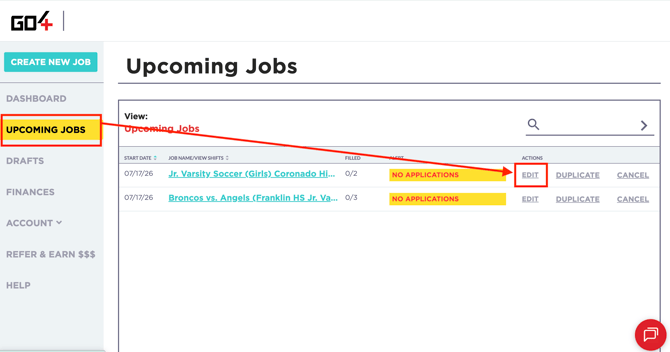
- Navigate to UPCOMING JOBS.
- Locate the job you would like to update.
- Select EDIT next to the job.
- Make your desired changes.
- Save your updates.
Examples of updates that can be made include:
- Event location
- Schedule and times
- Compensation
- Supplies available on-site
- Event details
- Credential requirements
- Emergency Action Plan information
- Job Contact information
Good to Know
Changes made at the job level automatically update all open and unfilled shifts associated with the job.
Editing Jobs With Confirmed Athletic Trainers
Once an Athletic Trainer confirms for a shift, the process changes.
Changes made by selecting UPCOMING JOBS → EDIT only update the information for open and unfilled shifts.
They DO NOT automatically update the details of shifts that have already been confirmed by Athletic Trainers.
This protects Athletic Trainers from committing to one set of details and later discovering the assignment has changed without their knowledge.
EXAMPLE: Location Change After Confirmation
Let's say:
- You post a job requiring two Athletic Trainers at Location A.
- One Athletic Trainer confirms for one of the shifts.
- The second shift remains open.
Later, you discover the event will actually take place at Location B.
If you edit the job through UPCOMING JOBS → EDIT, the updated location will apply only to the open shift.
The confirmed Athletic Trainer will still see Location A on their assignment until their individual shift is updated.
Updating a Confirmed Athletic Trainer's Shift
To update the details for a confirmed Athletic Trainer:
- Navigate to UPCOMING JOBS.
- Click on the name of the event.
- Open the "ATs" section.
- Locate the confirmed Athletic Trainer based on their status.
- Select EDIT JOB next to their status.
- Make the necessary changes.
- Save your updates.
Examples of changes that may require updating a confirmed shift include:
- Location changes
- Schedule changes
- Start or end time adjustments
- Event detail updates
- Changes to instructions or responsibilities
- Rate*
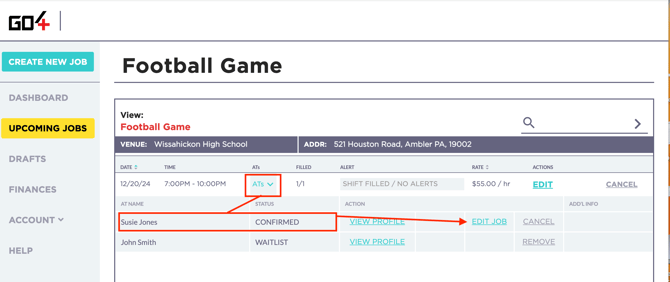
Important Note: Editing the job itself does not update confirmed assignments. Confirmed Athletic Trainers must be updated individually through the EDIT JOB functionality.
*Compensation Protection
Changes to a confirmed shift may include increasing the compensation offered to an Athletic Trainer, but compensation cannot be reduced after an Athletic Trainer has committed to work the shift.
This policy protects Athletic Trainers from agreeing to one rate and later discovering the shift pays less than the compensation they originally accepted.
What Happens When a Confirmed Shift Is Updated?
When changes are made to a confirmed Athletic Trainer's shift:
- The Athletic Trainer receives an email notification outlining the changes.
- The Athletic Trainer has 24 hours to review the updated information.
- If the changes impact their ability or willingness to work the event, they may call out during this window without negatively impacting their Reliability Score.
Examples include:
- A venue being moved significantly farther away.
- Major schedule adjustments.
- Significant changes to responsibilities.
- Changes that materially alter the original assignment.
Protecting Athletic Trainers
Athletic Trainers commit to assignments based on the information available at the time they apply and confirm. If those details change significantly, they are given an opportunity to reevaluate their availability without penalty.
Updating Event Locations
If your event location changes, update the address as soon as possible.
The event location is critical because Athletic Trainers use it to:
- Determine travel distance.
- Plan arrival times.
- Check into their shift.
- Verify attendance.
- Trigger payment processing.
Check-In Depends on Location
Athletic Trainers must be physically within the event's check-in radius to successfully check in and receive payment.
Updating Compensation
Organizations may increase compensation at any time to improve competitiveness and attract additional applicants.
Increasing compensation is often one of the most effective ways to improve applicant interest and secure coverage more quickly, particularly for last-minute shifts or areas with lower Athletic Trainer density.
However, compensation generally cannot be reduced once an Athletic Trainer has accepted or confirmed a shift.
Protecting Athletic Trainers
Athletic Trainers commit to assignments based on the compensation offered at the time they apply and confirm. To protect both parties, confirmed shifts cannot have their compensation reduced after confirmation.
Compensation Updates for Confirmed Athletic Trainers
It's important to understand that compensation changes made at the job level only apply to open and unfilled shifts.
Updating the rate through UPCOMING JOBS → EDIT does not automatically update the compensation for Athletic Trainers who have already confirmed for the event.
If you would like to increase the compensation for a confirmed Athletic Trainer, you must also update their individual shift through the EDIT JOB functionality.
Job-Level Rate Changes = Open Shifts
Shift-Level Rate Changes = Confirmed Athletic Trainers
Best Practice: Keep Compensation Consistent
If you increase the compensation on an open shift in order to attract additional applicants, we strongly recommend considering increasing the compensation of previously confirmed Athletic Trainers as well.
Athletic Trainers frequently communicate with one another, particularly when working the same event or organization.
Maintaining compensation consistency helps ensure that Athletic Trainers who applied early and committed quickly do not feel disadvantaged compared to individuals who applied later after a rate increase was introduced.
Reward Early Commitment
Athletic Trainers who apply and confirm early help reduce staffing risk and provide organizations with peace of mind. Matching compensation increases across all Athletic Trainers working the same event helps promote fairness and maintain positive relationships with your coverage team.
Editing vs. Canceling a Job or Shift
If the event is still taking place but details have changed, you should always use Go4's editing functionality rather than canceling the job or shift.
Examples include:
- Location changes
- Schedule changes
- Rate changes
- Updated event details
- Changes to instructions or responsibilities
Using the editing functionality ensures Athletic Trainers receive updated information while preserving the original commitment between both parties.
Changes = Edit
If coverage is still needed and the event is still happening, use the editing tools available on the platform rather than canceling the shift.
If coverage is no longer needed or the event is no longer taking place, the job or shift should be canceled directly on the Go4 platform as soon as possible.
Canceling through Go4 helps:
- Notify Athletic Trainers immediately.
- Prevent unnecessary travel or expenses.
- Allow Athletic Trainers to pursue other opportunities.
- Ensure accurate marketplace records.
No Event = Cancel
If coverage is no longer required, always cancel the job or shift within Go4 rather than relying on text messages, emails, or verbal communication alone.
Depending on timing, Go4's cancellation policy may apply.
👉 Learn More: Go4 Cancellation Policy
Why Cancelling Matters
Athletic Trainers often make arrangements based on confirmed assignments, including:
- Blocking time on their schedules
- Turning down other opportunities
- Purchasing fuel
- Booking lodging
- Traveling to event locations
Failing to cancel a job or shift on the platform may result in an Athletic Trainer arriving to provide coverage for an event that is no longer taking place.
Additionally, if the shift remains active in Go4 and the Athletic Trainer does not check in because the event was canceled, the system may initially interpret this as a no-show until reviewed by the Go4 team.
Because no-shows have a significant impact on an Athletic Trainer's Reliability Score and future opportunities, it is critical that cancellations are processed through the platform.
Protecting Athletic Trainers
Canceling promptly helps protect Athletic Trainers from unnecessary travel, lost time, and potential impacts to their Reliability Score.
What Happens If I Forget to Cancel?
If you forget to cancel a shift or are unable to cancel before the event begins, please contact our Support team at support@go4.io as soon as possible.
Our team can review the circumstances and help ensure the Athletic Trainer is protected appropriately.
If an Athletic Trainer arrives for coverage only to discover the event was canceled or coverage was no longer needed, Go4 may process applicable cancellation fees in accordance with the Go4 Cancellation Policy.
Late Cancellations
Athletic Trainers who reserve time on their schedules and commit to your event may be entitled to cancellation compensation depending on the timing of the cancellation and the circumstances surrounding the event.
FAQs
Can I edit a job after it has been posted?
Yes. Most job details can be updated after posting. However, the editing process differs depending on whether an Athletic Trainer has already confirmed for the shift.
What is the difference between editing a job and updating a shift?
-
Edit Job updates information for open and unfilled shifts.
-
Update Shift updates information for Athletic Trainers who have already confirmed for the event.
Simple Rule:
1. Edit Job = Open Shifts
2. Update Shift = Confirmed Athletic Trainers
Why didn't my confirmed Athletic Trainer receive my updates?
Changes made through Upcoming Jobs → Edit only apply to open and unfilled shifts.
Confirmed Athletic Trainers must be updated individually through the EDIT JOB functionality.
Can I change the event location after posting?
Yes. However, if an Athletic Trainer has already confirmed for the shift, you'll need to update both the job itself and the confirmed Athletic Trainer's shift separately.
Can I change the schedule after posting?
Yes. Schedule changes can be made at both the job level and the confirmed shift level depending on the status of your coverage.
Will the Athletic Trainer be notified if I update their confirmed shift?
Yes. Athletic Trainers automatically receive an email notification whenever changes are made to their confirmed assignment.
What happens if the Athletic Trainer no longer wants to work the shift after the changes?Athletic Trainers have 24 hours from the time they are notified of the changes to call out of the shift without negatively impacting their Reliability Score if the updated details impact their ability or willingness to work the event.
Examples may include:
-
A venue being moved significantly farther away
-
Major schedule adjustments
-
Significant changes to responsibilities
-
Material changes to the assignment
If the Athletic Trainer choses to call out, your job will automatically be re-marketed to Athletic Trainers in your area.
Can I increase compensation after posting?
Yes. Increasing compensation is often an effective strategy for attracting additional applicants and improving fill rates.
Can I reduce compensation after an Athletic Trainer confirms?
No. Compensation cannot be reduced after an Athletic Trainer has committed to work the shift.
This protects Athletic Trainers from agreeing to one rate and later discovering the opportunity pays less than originally advertised.
If I increase the rate on the job, does it automatically increase the rate for confirmed Athletic Trainers?
No. Changes made at the job level only impact open and unfilled shifts.
If you would like to increase compensation for a confirmed Athletic Trainer, you must update their individual shift separately using the Update Shift functionality.
Should I increase compensation for Athletic Trainers who already confirmed if I boost rates to fill open shifts?
While not required, this is considered a best practice.
Athletic Trainers often communicate with one another, particularly when working the same event or organization. Maintaining compensation consistency helps ensure Athletic Trainers who committed early do not feel disadvantaged compared to individuals who applied after a rate increase was introduced.
Should I edit or cancel my job?
-
If the event is still happening and coverage is still needed, use the editing functionality.
-
If the event is no longer taking place or coverage is no longer needed, cancel the job or shift through Go4.
Why is it important to cancel jobs on the platform?
Canceling through Go4 ensures Athletic Trainers are notified immediately and prevents unnecessary travel, expenses, and confusion.
Failure to cancel a shift on the platform may also result in an Athletic Trainer appearing as a no-show until the situation is reviewed by the Go4 team.
What happens if I forget to cancel a shift?
Please contact our Support team at support@go4.io as soon as possible.
If an Athletic Trainer arrives for coverage only to discover the event was canceled or coverage was no longer needed, applicable cancellation fees may apply in accordance with the Go4 Cancellation Policy.
Can I simply text or call the Athletic Trainer to tell them the event is canceled?
No. While direct communication is always appreciated, the cancellation should still be completed within Go4 so the platform accurately reflects the status of the shift and protects both parties.
What if I need help updating my job or confirmed shifts?
Please contact our Support team at support@go4.io and our team will be happy to assist.