
Circumstances can change, and you may need to cancel a job or shift. Go4 allows Job Posters to cancel jobs and shifts at any time.
However, if an Athletic Trainer has already been confirmed on the shift, cancellation fees and Athletic Trainer compensation may apply based on the timing of the cancellation.
For complete details regarding cancellation fees, Athletic Trainer compensation, and policy exceptions, please review our Marketplace Standards.
How do I cancel a job?
To cancel a job, log into your Go4 account and click UPCOMING JOBS and then click CANCEL in the actions column.
-
Canceling a job will remove all shifts and athletic trainers who applied.
-
This action cannot be undone.
-
Once a shift has been worked, you cannot cancel the entire job.
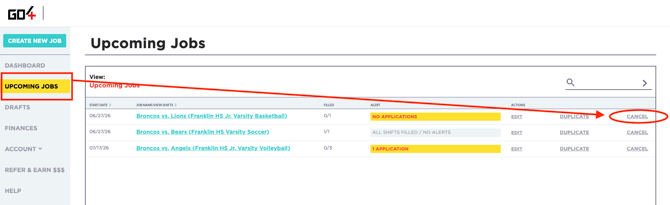
How do I cancel a shift?
If multiple shifts are posted under one job, you can delete specific shifts without deleting the entire job.
From UPCOMING JOBS click on the job name, then click CANCEL for the specific shift.
-
Canceling a job will remove all shifts and athletic trainers who applied.
-
This action cannot be undone.
-1.png?width=670&height=244&name=2%20(9)-1.png)
Understanding Cancellation Outcomes
| Shift Status | Can I Cancel? | Potential Impact |
| No Athletic Trainer Confirmed | Yes | No cancellation compensation applies |
| Athletic Trainer Confirmed | Yes | Cancellation fees and Athletic Trainer compensation may apply depending on timing |
| Weather-Related Cancellation | Yes | Standard cancellation fee does not apply |
Why Cancellation Fees May Apply
When an Athletic Trainer confirms a shift, they reserve time in their schedule and may turn down other opportunities to provide coverage for your organization.
For this reason, cancellations involving confirmed Athletic Trainers may result in cancellation compensation being paid to the Athletic Trainer based on the timing of the cancellation.
Cancellation Fee Schedule
| Time Before Shift Start | Outcome |
| 73+ Hours | Go4 Service Fee Only |
| 25-72 Hours | 25% of the shift cost paid to the Athletic Trainer |
| Less than 24 Hours | 25% of the shift cost paid to the Athletic Trainer |
| Weather-Related | No cancellation fee applies |
Weather-Related Cancellations
Weather-related cancellations may be audited by the Go4 team. Athletic Trainers who believe a shift was incorrectly classified as weather-related may submit a review request within 72 hours of the shift's scheduled time for further evaluation.
FAQs
My event's details changed, should I cancel the job?
No. If your event's details changed, such as the time, location and date but the event is still taking place, do not cancel the job. Instead, use the EDIT option next to the event name to make changes to your event.
If you need to change the details of a shift with a confirmed Athletic Trainer, you will need to click on the event name, click "ATs" to edit the job of the specific Athletic Trainer it may impact.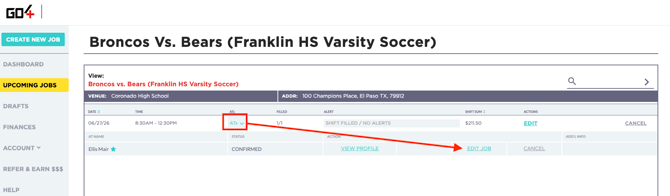
Example: You have a confirmed Athletic Trainer for your Basketball Tournament on January 5 at 10 AM but the time was changed to 2 PM. You will need to make the change to the Athletic Trainer's shift vs. to the whole event.
Can I cancel a job or shift at any time?
Yes. Job Posters can cancel a job or shift at any time. However, if an Athletic Trainer has already been confirmed, cancellation fees and Athletic Trainer compensation may apply depending on the timing of the cancellation.
Will I be charged a cancellation fee if no Athletic Trainer is confirmed?
No. If a shift is canceled before an Athletic Trainer has been confirmed, cancellation compensation does not apply.
What happens if an Athletic Trainer has already been confirmed?
Once an Athletic Trainer confirms a shift, they reserve time in their schedule and may turn down other opportunities to provide coverage for your organization. Depending on when the cancellation occurs, cancellation compensation may be owed to the Athletic Trainer in accordance with Go4's Marketplace Standards.
Are weather-related cancellations subject to cancellation fees?
No. Weather-related cancellations are not subject to standard cancellation compensation.
Weather-related cancellations may be audited by the Go4 team and Athletic Trainers may request a review if they believe a shift was incorrectly classified as weather-related.
What if I accidentally cancel a shift?
If a shift was canceled in error, contact our Support team at support@go4.io as soon as possible. While we cannot guarantee that a canceled shift can be restored, our team will review the situation and advise on available options.
Where can I learn more about cancellation fees and policies?
For complete details regarding cancellation fees, Athletic Trainer compensation, weather-related cancellations, and policy exceptions, please review our Marketplace Standards.