---
title: How to Post a Job on Go4
description: Learn how to post a job on Go4 with step-by-step instructions to create, publish, and manage your job listing on the platform.
---
[Skip to content](https://support.go4.io/how-do-i-post-a-job-on-go4#main-content)
English - United States
Show submenu for translations

- [Support Home](https://50706065.hs-sites.com/support)
- [Healthcare Professionals](https://50706065.hs-sites.com/support/athletic-trainers)
- [Job Posters](https://50706065.hs-sites.com/support/job-posters)
Open main navigation
Close main navigation
- [Support Home](https://50706065.hs-sites.com/support)
- [Healthcare Professionals](https://50706065.hs-sites.com/support/athletic-trainers)
- [Job Posters](https://50706065.hs-sites.com/support/job-posters)
- English - United States
Show submenu for translations
This is a search field with an auto-suggest feature attached.
- There are no suggestions because the search field is empty.
1. [Support](https://support.go4.io/?hsLang=en-us)
2. [Job Posters](https://support.go4.io/job-posters?hsLang=en-us)
3. [Getting Started](https://support.go4.io/job-posters?hsLang=en-us#getting-started)
# How to Post a Job on Go4
## Learn how to create and post a job on Go4, what information is required, and best practices for attracting qualified Athletic Trainers to your event.
Posting a job on Go4 allows you to connect with qualified Athletic Trainers in your area and secure coverage for your event.
Each job contains one or more shifts that Athletic Trainers can apply to. During the job creation process, you'll provide details about your event, compensation, location, and scheduling needs.
To help maximize applications and improve your chances of filling your job quickly, it's important to provide accurate event details, competitive compensation, and clear expectations for applicants.
**Before You Begin**
Be prepared to provide your event details, location, compensation, shift dates and times, and a designated Job Contact. The more complete your job information is, the easier it is for Athletic Trainers to determine whether the opportunity is a good fit.
📽️ **Watch how to post your job on Go4 in a few easy steps!**
---
### **Step 1: Navigate to Post a Job**
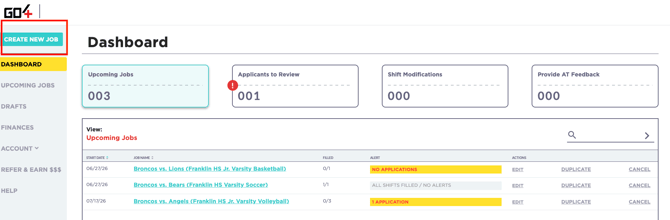
1. Log in to your Go4 account.
2. Navigate to the CREATE NEW JOB button on the upper-left-hand corner of your dashboard.
3. Begin creating your job.
### **Step 2: Complete Your Job Details**
A job contains the core information Athletic Trainers will review before deciding whether to apply. Providing complete and accurate information can help attract qualified applicants and reduce questions later in the hiring process.
##### **Profile**
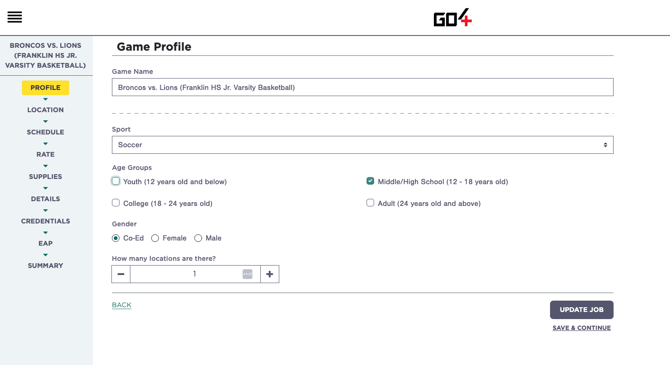
The Profile section contains basic information about your organization and event.
This will include:
- Event Name
- Event Type
- Age Groups and Gender
- Number of Locations
This information helps Athletic Trainers quickly identify the opportunity.
Choose an event name that clearly identifies the event so Athletic Trainers can easily understand what coverage is being requested.
##### **Location**
Enter the location where coverage is needed.
Be sure to provide:
- Venue Name (if applicable)
- Street Address
- Estimated Number of Participants
##### **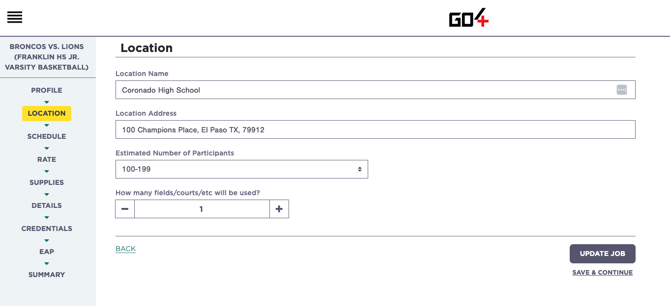**
**Important Note:** The event location is used by Athletic Trainers to evaluate travel distance and availability. It is also used by the Go4 app to verify attendance, as Athletic Trainers must be within the designated check-in radius of the event address to successfully check in and begin the payment process.
Please ensure the location entered accurately reflects where coverage will occur.
##### **Schedule**
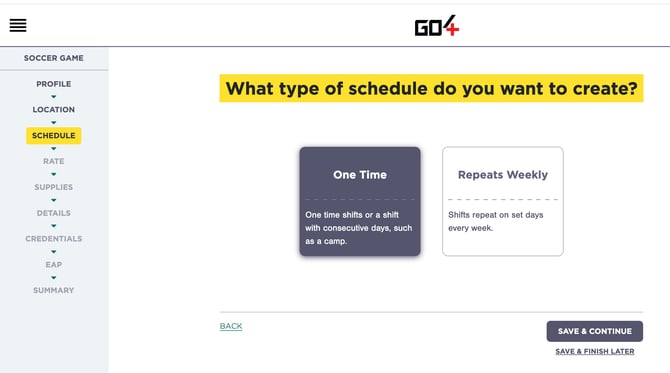
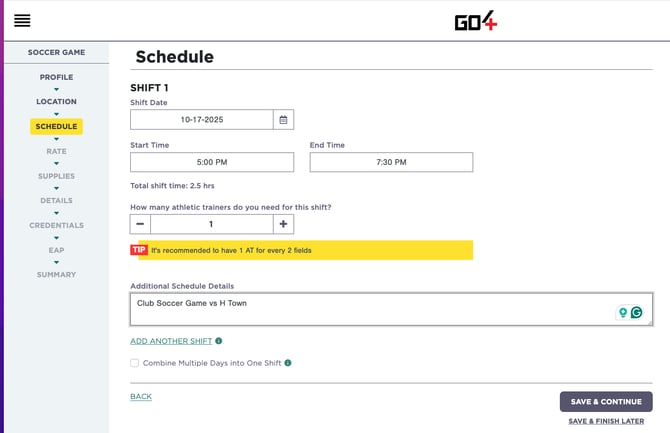
The Schedule section is where you'll create the shift or shifts associated with your job.
For each shift, you'll enter:
- Date
- Start Time
- End Time
- Number of Athletic Trainers Needed
You can create:
- **One-Time Shifts** for a single event or coverage need.
*Example: Annual Toys for Tots Half Marathon Event*
- **Recurring Shifts** for events that repeat on a regular schedule.
*Example: Weekly Soccer Practice (Every Monday and Wednesday)*
For recurring coverage, you can choose to repeat shifts on a weekly basis rather than creating each shift individually.
**Good to Know**
A single job can contain multiple shifts. Athletic Trainers apply to individual shifts within the job, allowing them to apply for one, some, or all available shifts depending on their availability.
**Recurring Coverage**
If your organization hosts practices, games, clinics, or events on a consistent schedule, you can use the recurring shift option to create multiple weekly shifts at once. This can save time and help ensure your coverage needs are posted well in advance.
##### **Rate**
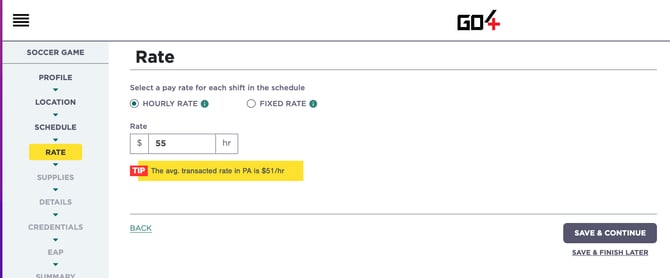
The Rate section allows you to determine how Athletic Trainers will be compensated for providing coverage.
You may choose to post your job using either:
- **Hourly Compensation** – Athletic Trainers are paid based on the number of hours worked.
- **Fixed Compensation** – Athletic Trainers receive a predetermined amount for the shift regardless of duration.
When determining your rate, consider factors such as:
- Length of coverage
- Level of competition
- Travel requirements
- Event complexity
- Local market demand
**You're in Control**
You have full control over the rate you choose to post. To help you remain competitive, Go4 provides the average transacting rate for similar opportunities in your area based on recent marketplace activity. While this information is intended to help guide your decision, you are always free to set the rate that best fits your organization's needs and budget.
**Hourly vs. Fixed Compensation**
Go4 supports both hourly and fixed-rate jobs. While organizations can choose either option, we generally see the highest level of Athletic Trainer engagement and application volume on hourly opportunities.
**Tip:** Competitive compensation is one of the most important factors influencing how quickly a job receives applications. Jobs posted significantly below the average market rate may take longer to fill or receive fewer applicants.
##### ****
**Low Rate Warning**
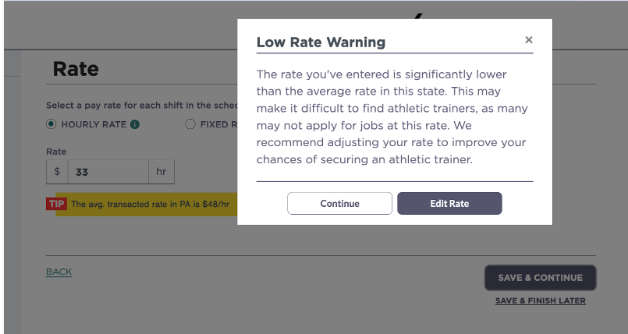
If your compensation falls significantly below the average transacting rate in your market, Go4 may display a low rate warning during the posting process. This warning is intended to provide additional visibility into local market conditions and help set expectations around applicant interest and fill rates.
Jobs posted below market rates may receive fewer applications or take longer to fill, particularly in areas with limited Athletic Trainer availability.
##### **Supplies**
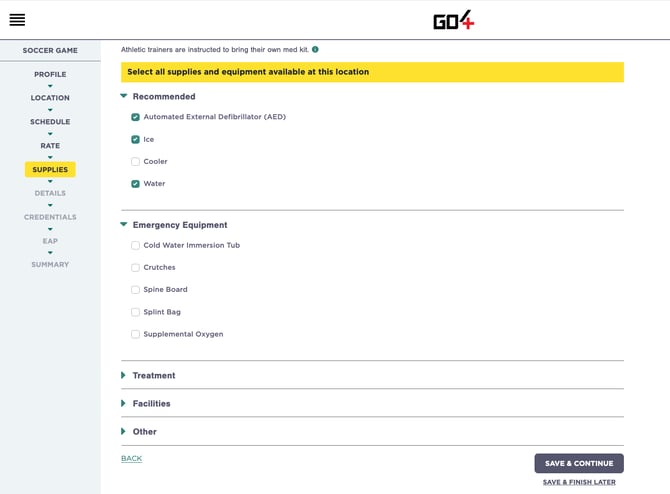
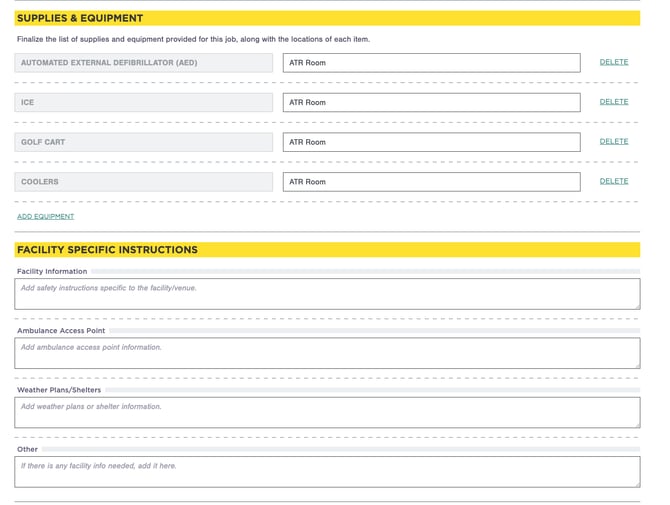
The Supplies section allows you to communicate what medical supplies, equipment, and resources may be available on-site during the event.
Examples may include:
- Ice
- Water
- AED
- Treatment table
- Medical tent
- Athletic training room access
- First aid supplies
- Additional medical staff
Providing this information helps Athletic Trainers understand what support will be available during the event.
**Good to Know**
Organizations are not required to provide medical supplies or equipment. However, providing visibility into what resources are available on-site helps Athletic Trainers prepare appropriately and deliver the best possible care for your participants.
**Athletic Trainer Medical Kits**
Athletic Trainers are healthcare professionals and typically arrive with their own medical kit and supplies. The contents of those kits may vary based on the Athletic Trainer's experience, preferences, and the type of event being covered. Each Athletic Trainer is responsible for determining what supplies they need to bring to support the event safely.
**Ice Is Worth Mentioning**
Ice is one of the most commonly used resources during athletic events, but it is not typically something Athletic Trainers transport with them. If ice will be available on-site, we strongly encourage you to indicate that within the job posting. Providing this information can help Athletic Trainers prepare appropriately and avoid unnecessary surprises on event day.
##### **Details**
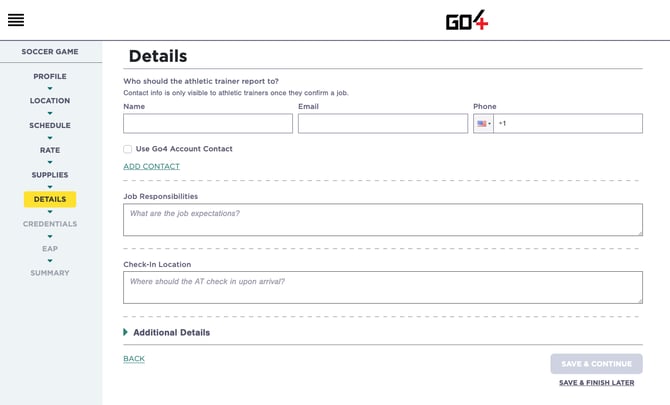
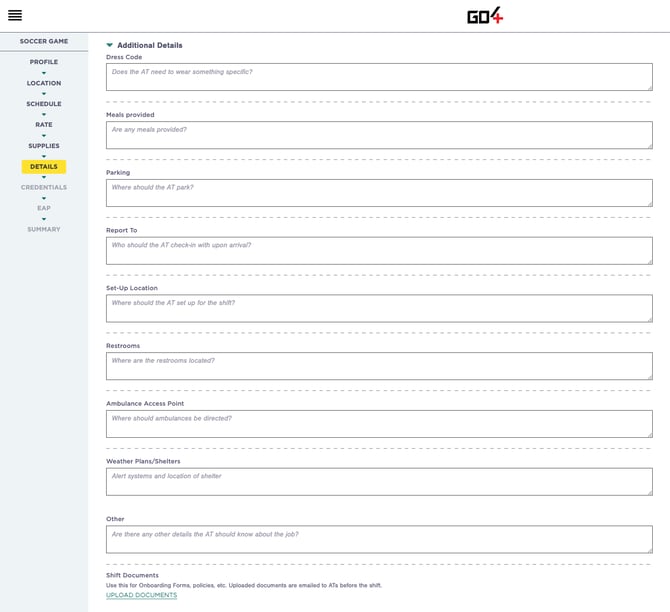
The Details section is your opportunity to explain the event and any important expectations.
Consider including:
- Event format (games, tournament, camp, clinic, showcase, etc.)
- Age groups or participant level
- Expected responsibilities
- Arrival instructions
- Parking information
- Any special requirements
**Post the Event as It Will Actually Occur**
Athletic Trainers rely on the information provided in the job when deciding whether to apply. Event details, participant level, responsibilities, and risk exposure should accurately reflect the coverage being requested.
##### **Credentials**
The Credentials section allows you to communicate any additional requirements Athletic Trainers must meet before working your event.
Examples may include:
- Background Checks
- SafeSport Training
- Fingerprinting
- State-specific clearances
- Organization-specific onboarding requirements
- Other compliance documentation
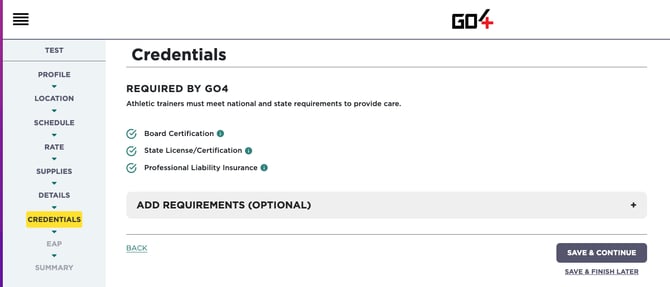
**Important Note:** Go4 verifies and reviews three core credentials before Athletic Trainers are eligible to apply for shifts:
- Board of Certification (BOC)
- Professional Liability Insurance (PLI)
- State Licensure or Certification (where required)
If your organization requires any additional credentials beyond these three items, it is your responsibility to communicate those requirements within the job posting.
**Additional Credential Requirements**
Go4 does not verify, review, or approve organization-specific requirements such as background checks, SafeSport training, fingerprinting, or other supplemental documentation. Organizations are responsible for reviewing any additional credentials they require and determining whether an Athletic Trainer meets their standards.
**Best Practice**
Clearly communicate any additional credential requirements before publishing your job. Providing this information upfront helps Athletic Trainers determine whether they qualify for the opportunity and can reduce delays during the hiring process.
##### **Emergency Action Plan (EAP)**
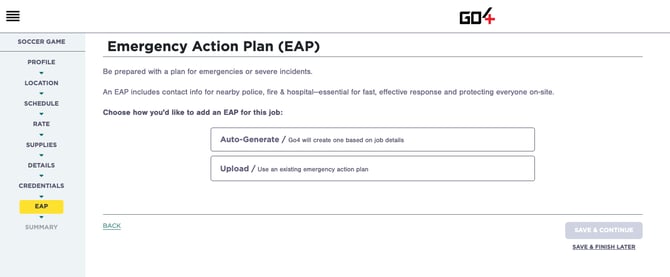
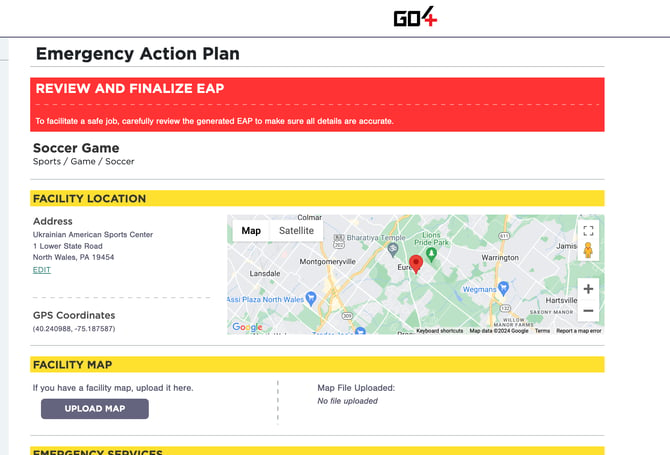
The Emergency Action Plan (EAP) section allows you to provide important emergency response information for the venue where coverage is taking place.
An EAP helps Athletic Trainers prepare for emergencies before they happen by providing information such as:
- Emergency contacts
- Facility addresses
- Emergency equipment locations
- Venue access points
- Emergency procedures
- Nearby medical facilities
Having an EAP readily available can help improve emergency response times and ensure everyone involved understands their role during a critical incident.
**Why EAPs Matter**
In the event of a serious injury, medical emergency, or catastrophic incident, having a documented Emergency Action Plan can play an important role in risk management and liability mitigation. EAPs help establish clear procedures, improve communication, and ensure emergency responders can be activated quickly when every second matters.
**Don't Have an EAP? We've Got You Covered.**
If you do not already have an Emergency Action Plan, Go4 will automatically generate one for your event using the information provided in your job posting. This allows you to quickly create a venue-specific EAP without having to build one from scratch.
**Already Have Your Own EAP?**
No problem. Organizations that already maintain an Emergency Action Plan can upload their existing document directly within the job. This ensures Athletic Trainers have access to the procedures and information your organization has already established.
**Tip:** Whether using a Go4-generated EAP or your own document, we recommend reviewing it regularly to ensure emergency contacts, venue information, and response procedures remain accurate and up to date.
##### **Summary**
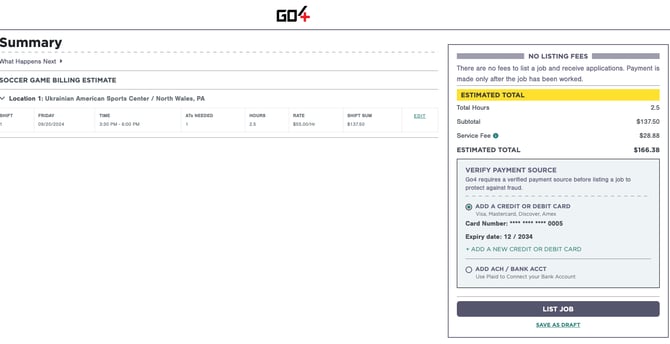
The Summary section provides a final overview of your job before it is published to the Go4 marketplace.
Use this opportunity to review all information for accuracy, including:
- Event location
- Shift dates and times
- Compensation
- Athletic Trainers needed
- Shift sum
**Final Review**
The Summary page displays the details of the job and shifts you're about to publish. We strongly recommend reviewing all information carefully to ensure everything accurately reflects your coverage needs before making the job available to Athletic Trainers.
**No Cost to Post Jobs**
Go4 does not charge organizations to post jobs. You can create and publish as many jobs as needed without incurring any fees.
Organizations are only charged once services have been rendered. Services are considered rendered when an Athletic Trainer arrives at the event and successfully checks in through the Go4 app. Payment processing begins approximately 24 hours after the shift ends.
**Payment Method Required**
A valid payment method must be added to your account before a job can be published.
The payment method on file will be used to process charges once services have been rendered and payment is due for completed shifts.
---
### **Step 3: List Your Job and Payment Processing**
Once you've reviewed your job details, you're ready to list your job.
Listing a job makes your shifts visible to qualified Athletic Trainers who can begin applying immediately.
##### **Posting Jobs is Free**
Go4 does not charge organizations to post jobs.
You can create and publish as many jobs as needed without incurring any upfront fees.
**No Upfront Costs**
Whether you post one job or one hundred jobs, Go4 does not charge organizations simply for creating or publishing opportunities.
##### **Payment Method Required**
Before a job can be published, a valid payment method must be added to your account.
The payment method on file will be used to process payment once services have been rendered.
##### **When am I charged?**
Organizations are only charged after services have been successfully provided.
Services are considered rendered when:
1. The Athletic Trainer arrives at the event.
2. The Athletic Trainer successfully checks in through the Go4 app.
3. The shift is completed.
Payment processing typically begins approximately 24 hours after the shift ends and is paid out to the Athletic Trainer within 2-5 business days.
**Athletic Trainer Payout Timing**
While Job Posters are charged after services have been rendered, the timing of an Athletic Trainer's payout may vary. Organizations that choose ACH as their payment method may result in longer processing times before funds are available for payout.
**Why Check-In Matters**
The Go4 check-in process verifies attendance, confirms services were provided, and initiates payment processing.
##### **How Go4 Pricing Works**
Athletic Trainers receive 100% of the compensation rate you post for a shift.
Go4 does not deduct fees from Athletic Trainer earnings.
Instead, organizations are charged a 17.5% Go4 Service Fee that helps support:
- The Go4 platform and technology
- Access to Go4's nationwide Athletic Trainer network
- Marketing your jobs to qualified Athletic Trainers
- Emergency Action Plan (EAP) generation
- Applicant management and hiring tools
- Payment processing
- 1099-K handling and reporting
- Customer support and marketplace operations
**Why Athletic Trainers Prefer Go4**
Athletic Trainers receive 100% of the rate posted by the organization. This transparency helps Athletic Trainers clearly understand what they will earn and is one of the reasons Go4 has become a trusted platform for per diem opportunities across the country.
---
### **FAQs**
**Does it cost anything to post a job?**
No. Go4 does not charge organizations to create or publish jobs.
Organizations are only charged once services have been rendered by an Athletic Trainer.
**When am I charged for a job?**
Organizations are charged after services have been rendered.
Services are considered rendered when an Athletic Trainer successfully checks in through the Go4 app and completes the shift. Payment processing typically begins approximately 24 hours after the shift ends.
**Why do I need a payment method on file?**
A valid payment method is required before a job can be published.
The payment method on file will be used to process charges once services have been rendered.
**What does the Go4 Service Fee cover?**
Go4 charges a 17.5% service fee to support:
- Access to the Go4 platform
- Marketing your job to Athletic Trainers
- Access to Go4's nationwide Athletic Trainer network
- Emergency Action Plan (EAP) generation
- Applicant management and hiring tools
- Payment processing
- 1099-K handling and reporting
- Customer support and marketplace operations
**Do Athletic Trainers receive the full rate I post?**
Yes. Athletic Trainers receive 100% of the compensation rate you post.
The Go4 Service Fee is charged separately to the organization.
**Can I post multiple shifts within one job?**
Yes. A single job can contain one or more shifts.
Athletic Trainers apply to individual shifts within the job.
**Can I create recurring shifts?**
Yes. Go4 allows you to create both one-time and recurring weekly shifts, making it easy to manage ongoing coverage needs.
**Can I edit a job after publishing it?**
Yes. Most job details can be edited after publishing.
However, if Athletic Trainers have already applied or been hired, certain changes may impact the hiring process and require additional communication.
**Can I add additional shifts to an existing job?**
Yes. Additional shifts can be added to an existing job as your coverage needs change.
**What information should I include in the job description?**
We recommend including:
- Job Contact Information
- Expected responsibilities
- Arrival instructions
- Parking information
- Any special requirements
The more information provided, the easier it is for Athletic Trainers to determine whether the opportunity is a good fit. Athletic Trainers like to know what they're walking into.
**Can I require additional credentials?**
Yes. Organizations may require additional credentials beyond Go4's standard requirements.
Examples include:
- Background Checks
- SafeSport Training
- Fingerprinting
- State-specific clearances
- Organization-specific onboarding requirements
**What credentials does Go4 verify?**
Go4 verifies:
- Board of Certification (BOC)
- Professional Liability Insurance (PLI)
- State Licensure or Certification (where applicable)
Any additional credential requirements will need to be reviewed and approved by the organization, not Go4.
**Do I need to provide medical supplies?**
No. Organizations are not required to provide medical supplies.
However, we encourage organizations to indicate what resources may be available on-site, such as ice, water, AEDs, treatment tables, or first aid supplies. This helps Athletic Trainers prepare appropriately for the event.
**Do I need an Emergency Action Plan (EAP)?**
While not required, Go4 strongly recommends that every event have an Emergency Action Plan.
If you do not have your own EAP, Go4 can automatically generate one using the information provided in your job posting.
**Can I upload my own Emergency Action Plan?**
Yes. Organizations that already maintain an EAP can upload their existing document directly within the job.
**Why is the event location important?**
The event location helps Athletic Trainers evaluate travel distance and availability.
It is also used by the Go4 app to verify attendance, as Athletic Trainers must be within the designated check-in radius of the event address to successfully check in and initiate payment processing.
**What happens after I list my job?**
Once your job is listed:
1. Athletic Trainers can begin applying to your shifts.
2. You review applicants.
3. You accept the Athletic Trainer you'd like to hire.
4. The Athletic Trainer confirms the shift.
5. Coverage is secured.
👉 [Learn More: How Hiring Works on Go4](https://support.go4.io/how-does-the-hiring-process-work-on-go4?hsLang=en-us)
**What if I'm not receiving applications?**
If your job is not receiving applications, consider:
- Increasing the compensation rate
- Posting further in advance
- Providing more detailed event information
- Reviewing whether the rate is competitive for your market
**Can I cancel a job after posting it?**
Yes. Jobs and shifts can be canceled at any time.
However, if an Athletic Trainer has already reached a **Confirmed** status, Go4's cancellation policy may apply.
👉 [Learn More: Cancellation Policy & Compensation](https://support.go4.io/go4-cancellation-policy?hsLang=en-us)
**Who can I contact if I need help posting a job?**
If you have questions about creating a job, hiring Athletic Trainers, or managing coverage, contact our Support team at support@go4.io and our team will be happy to help.
- [Job Posters](https://support.go4.io/job-posters?hsLang=en-us#main-content)
- [Getting Started](https://support.go4.io/job-posters?hsLang=en-us#getting-started)
- [Hiring an Athletic Trainer](https://support.go4.io/job-posters?hsLang=en-us#hiring-an-athletic-trainer)
- [Finance and Payments](https://support.go4.io/job-posters?hsLang=en-us#finance-and-payments)
- [Athletic Trainers](https://support.go4.io/athletic-trainers?hsLang=en-us#main-content)
- [Getting Started](https://support.go4.io/athletic-trainers?hsLang=en-us#getting-started)
- [Working a Job](https://support.go4.io/athletic-trainers?hsLang=en-us#working-a-job)
- [Features](https://support.go4.io/athletic-trainers?hsLang=en-us#features)
- [Finance and Payments](https://support.go4.io/athletic-trainers?hsLang=en-us#finance-and-payments)
- [FAQs and Troubleshooting](https://support.go4.io/athletic-trainers?hsLang=en-us#faqs-and-troubleshooting)
- [Home](https://go4.io/)
- [Post a Job](https://go4.io/)
- [Work a Job](https://go4.io/)
- [About Us](https://www.go4.io/about-us/)
[](https://support.go4.io/?hsLang=en-us)
[Terms & Conditions](https://go4.io/terms-and-conditions/) | [Privacy Policy](https://go4.io/privacy-policy/)
© 2026 Go4
```json
{
"@context" : "https://schema.org",
"@type" : "VideoObject",
"contentUrl" : "https://50706065.fs1.hubspotusercontent-na1.net/hubfs/50706065/video_assets/206859887801/inherited/web_optimized.mp4",
"dateModified" : "2026-02-04T10:56:41.825Z",
"duration" : "PT3M31S",
"height" : 927,
"name" : "Hire Athletic Trainers Fast _ Log In to Post Your Job - 3 July 2025",
"thumbnailUrl" : "https://50706065.fs1.hubspotusercontent-na1.net/hubfs/50706065/Hire%20Athletic%20Trainers%20Fast%20_%20Log%20In%20to%20Post%20Your%20Job%20-%203%20July%202025.mp4/medium.jpg",
"uploadDate" : "2026-02-04T10:56:31.002Z",
"width" : 1470
}
```