
Your Go4 password helps protect your personal information, credentials, payment details, and account activity.
Whether you've forgotten your password or simply want to update it, you can reset your password at any time.
Account Security
We recommend using a unique, secure password for your Go4 account and avoiding passwords that are shared across multiple websites or applications.
Forgot Your Password?
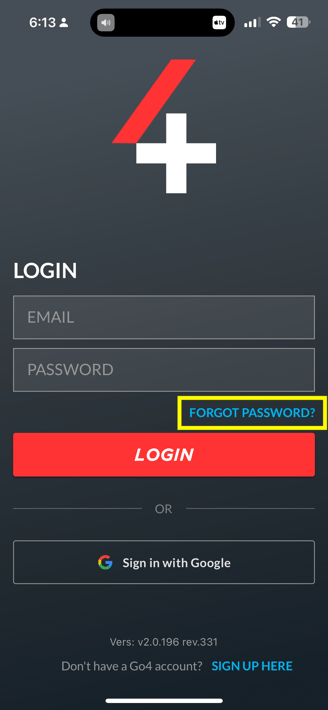
If you're unable to log in to your account, you can request a password reset from the Go4 login screen.
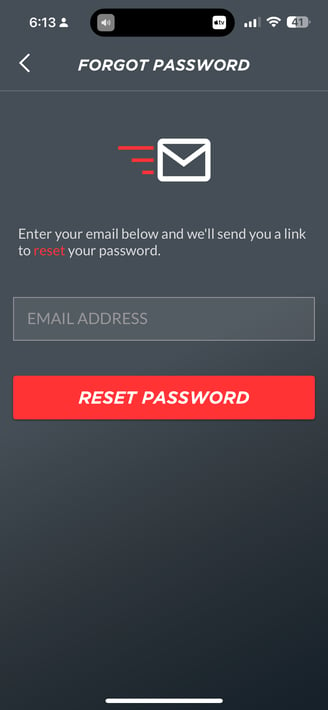
To reset your password:
- Open the Go4 app.
- Select Forgot Password? on the login screen.
- Enter the email address associated with your Go4 account.
- Check your email for a password reset link.
- Follow the instructions to create a new password.
- Return to the Go4 app and log in using your new password.
Didn't Receive the Email?
Check your Spam or Junk folder and confirm you're using the email address associated with your Go4 account. If you're still unable to locate the email, please contact our Support team at support@go4.io for assistance.
Changing Your Password
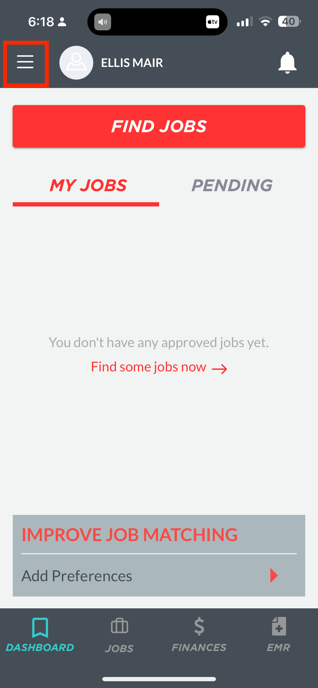
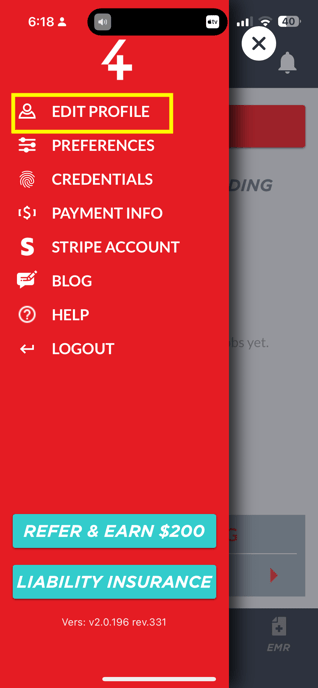
If you're already logged in and would like to update your password:
- Open the Go4 app.
- Navigate to the menu icon (three horizontal lines on the upper-right-hand corner).
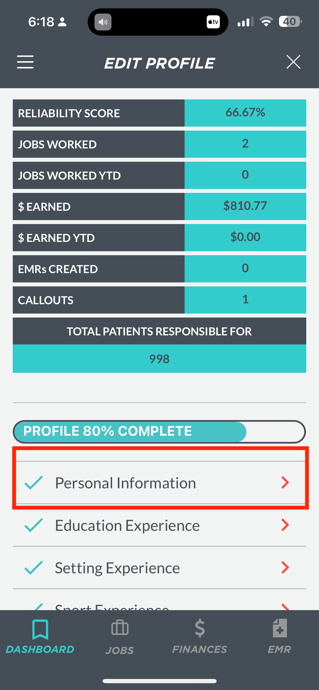
- Select Edit Profile.
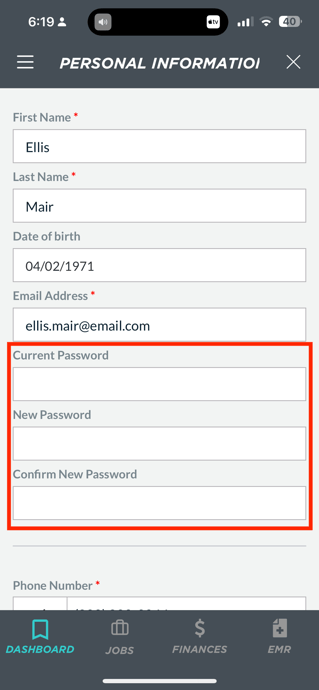
- Select Personal Information.
- Locate the Password section.
- Enter your new password.
- Save your changes.
Tips for Creating a Strong Password
When creating a new password, consider the following best practices:
- Use a unique password that isn't used for other accounts.
- Include a combination of uppercase letters, lowercase letters, numbers, and special characters.
- Avoid using easily guessed information such as your name or birthday.
- Consider using a password manager to generate and securely store passwords.
Protect Your Account
Never share your Go4 password with another person. Your account contains personal information, credential documentation, banking information, and payment history.
FAQs
I forgot my password. What should I do?
Select "Forgot Password?" from the Go4 login screen, enter the email associated with your account, and follow the instructions sent to your inbox.
I didn't receive my password reset email. What should I do?
First, check your Spam or Junk folder.
If you still don't receive the email:
-
Confirm you're using the correct email address associated with your Go4 account.
-
Wait a few minutes and request another password reset.
-
Contact our Support team at support@go4.io if the issue persists.
Can I change my password while I'm logged in?
Yes. You can update your password at any time by navigating to Profile → Edit Profile → Password within the Go4 app.
Will changing my password affect my profile or credentials?
No. Changing your password only updates your login credentials. Your profile information, credentials, banking details, and application history will remain unchanged.
Can Go4 Support reset my password for me?
For your security, Go4 Support cannot view or manually set your password.
If you're unable to access your account after attempting a password reset, please contact our Support team at support@go4.io, and we'll help you troubleshoot the issue.
Why should I use a unique password?
Using a unique password helps protect your account from unauthorized access and reduces the risk of other online account compromises affecting your Go4 account.